How to rebuild a dataset that is build from an Excel file that is located in a managed folder?

After successfully refreshing the Excel file in the managed folder, I can't find out how to refresh the downstream dataset.
The Excel file in the managed Folder is successfully refreshed by dragging the updated Excel file 'data_cleansing.xls' to the Managed Folder and overwriting the old version of this file.

But the Upstream Build of the dataset 'data_cleansing' doesn't result in an update of the data. The data in the dataset 'data_cleansing' remains unchanged. How can the data in this dataset be updated with the newly uploaded data?


Operating system used: Windows
Operating system used: Windows
Best Answer
-
 Turribeach Dataiku DSS Core Designer, Neuron, Dataiku DSS Adv Designer, Registered, Neuron 2023, Circle Member Posts: 2,677 Neuron
Indeed that's the problem. Uploaded datasets are just that, uploaded datasets. If you want them to update an uploaded dataset you need to re-upload them. In other words the data_cleansing in the first project is a completely different dataset than the uploaded one. Using datasets from files in Managed Folders is way better than using uploaded datasets since the managed folders datasets can be updated directly on the managed folder without doing anything in Dataiku. Furthermore your Managed Folder could be on network storage, NAS storage, cloud buckets etc meaning that this file update can be triggered completely independently from another system which write access to the same storage folder.
To solve your issue you should "share" the data_cleansing from the Project 1 Managed Folder into the Project 2. Then edit the sync recipe and add the new data_cleansing shared as an input and delete the data_cleansing uploaded dataset input. Finally delete the data_cleansing uploaded dataset (it should now be left orphan in the flow). If you don't want to share the dataset across projects you will need to add the Managed Folder to project 2.
Answers
-
Turribeach Dataiku DSS Core Designer, Neuron, Dataiku DSS Adv Designer, Registered, Neuron 2023, Circle Member Posts: 2,677 Neuron
Dataiku works in a simple concept, recipes have inputs and outputs. To update an output dataset (which Dataiku calls "build") you run (aka build) it which in effect runs the recipe that outputs it. The only exception to this rule are [flow] "input" datasets (not to be confused with recipe input datasets). These are external datasets that are not "buid" (in Dataiku words "managed") by Dataiku. Typically these are at the beginning of your flow. data_cleansing is such an input dataset. It can not be rebuild. If you want new data from the managed folder / data_cleansing dataset to be loaded you need to run the recipe (aka build) that uses data_cleansing as an input. Finally what you see on the Explore tab in the data_cleansing dataset is a data sample, which may not be the latest data. You can update the sample if needed but this will not push the data upstream, it's just for display purposes only. The sample issue applies to all datasets, external input, input or outputs. You nearly never see all data (aside from tiny datasets) and nearly never see "live" data.
-
Thank you for your fast response, Turribeach.
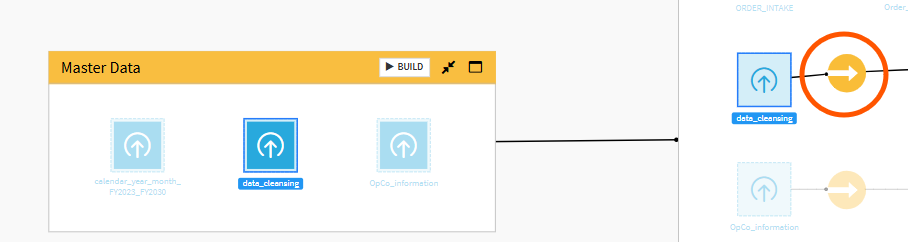
A run of the recipe that uses 'data_cleansing' as an input didn't result in an update of the datasets that it builds.Maybe this has to do with my setup of projects and flowzones, and with the use of a dataset Upload.

The managed folder and the dataset 'data_cleansing' are located in a project (let's call it 'Project 1'), while the Upload and the recipe that uses Upload are located in another project (let's call it 'Project 2').Running the recipe in the read circle (in Project 2) doesn't result in an update of the dataset it builds.
-
That solved the problem, Turribeach.
Thank you very much!

