Quick feedback for SQL notebook new features!

Hi dataiku users,
My name is Han, the technical product manager who worked on SQL notebook in DSS.
We have shipped some major improvements of SQL notebook for release 14.3 and 14.4, including autocomplate, charts and SQL assitant.
If you have tried the new features, we'd love to get your quick feedback!
Just a couple of short questions:
- Does SQL notebook work for you?
- What is not working or could be improved?
- The last time you used it, what bigger task or project were you trying to accomplish?
Feel free to reply directly to this post - even short answers are super helpful.
Thanks a lot,
Han
Answers
-
 Turribeach Dataiku DSS Core Designer, Neuron, Dataiku DSS Adv Designer, Registered, Neuron 2023, Circle Member Posts: 2,719 Neuron
Hi Han,
Let me first thank you for your great work in enhancing the SQL Notebook feature. I am really impressed how far this core functionality has come and it's getting really close to fully fledged SQL IDE. Personally I think the SQL Notebook is an often ignored capability but of course it does require the user to understand and use SQL so naturally it gravitates towards the Coders not the Clickers.
While Dataiku has had many new features in other areas sometimes I feel there is too much focus on GenAI and core features are somehow neglected. Clearly not in the SQL Notebook case but if you are looking for new areas for improvement Scenarios really needs a good uplift as it's missing a lot basic features (happy to discuss offline if you want).
OK now let give you some feedback on SQL Notebook:- Please create new query tab by default on new notebooks, why force the user to do it?
- Will be great if we could have deep links for query tabs, as it is not currently possible to send a link to a specific query within a SQL Notebook
- When the left tables pane is selected is not possible to expand the divider with the query section to be able to see the full table name. Please make this moveable (and save the position) so we can see tables with longer names (see redesign on the next point as it will allow for wider tables pane)
- I think the GUI could do with a better design. There is not enough visibility of the left pane between the Tables/Queries selection, this confuses new users. It's just not clear enough these can be changed or which one is selected. It also requires constant flipping if you are adding tables between different queries. I would suggest to move to a more traditional design with a fixed left tables pane and queries as tabs across the top of the query box. That way the Tables pane is always there and users just select tabs for each query. Of course the issue with this design idea is that a notebook with many query tabs may not be able to display them all, but from what I have seen users usually have 5-10 queries per notebook so this shouldn't impact many users
- Allow to change connections for notebooks. This can already be done via the Python API but it's not possible in the GUI so when a connection is deleted the SQL notebook is left orphan and the Administrator has to either recreate the connection or the user has to move the queries to a new SQL notebook manually. In fact the whole idea of 1-to-1 SQL Notebooks to connections seems outdated. Why not allow users to select whichever connection they want for each query tab?
- When looking at tables in the left tables pane users can add the table name to the query by clicking in the + or the column name by clicking in the column name. This is great functionality but it's very hard to discover. The + only shows when you hoover over the table name and only works when you are actually on top of the +. The column name works when you click in any parts of the column name including the data type but again it's not easy to discover. Consider making the plus on tables always visible and add a plus for columns too for easier discovery. Also make the functionality consistent (ie the click works on any part of the name or just the +)
Hope that's not too much to ask!
Many thanks for making Dataiku a much better product. -
Turribeach Dataiku DSS Core Designer, Neuron, Dataiku DSS Adv Designer, Registered, Neuron 2023, Circle Member Posts: 2,719 Neuron
Forgot a couple:
7. Auto-complete is a great addition but it seems incomplete. For instance in a Databricks SQL Notebook it doesn't recognise the months_between function.
8. Along with auto-complete it will be great to get synthax help from functions and syntax highlighting like proper IDEs do. In fact in this area it might make sense to allow SQL Notebooks to use other existing IDEs syntax highlighting, auto-complete and function syntax as then we will able to benefit from community driven language helpers which can evolve and be community supported.
-
Hello @Turribeach !
Thanks for taking the time to share your feedback! Super happy to see that you have seen and enjoyed our work on SQL notebook! I will definitely share that with the team.
Clearly not in the SQL Notebook case but if you are looking for new areas for improvement Scenarios really needs a good uplift as it's missing a lot basic features (happy to discuss offline if you want).
Would be happy to discuss your thoughts on scenario for sure.
Now, let me response to your feedback
1.Please create new query tab by default on new notebooks, why force the user to do it?
Great suggestion. we noticed this too and we will be shipping this for the new release
2.Will be great if we could have deep links for query tabs, as it is not currently possible to send a link to a specific query within a SQL Notebook
This too. In the new release, you can share a link to a specific query to your colleages.
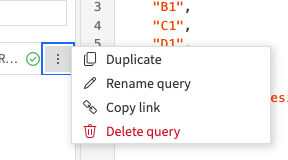
3.Please make this moveable
This too. Will ship in the new release.
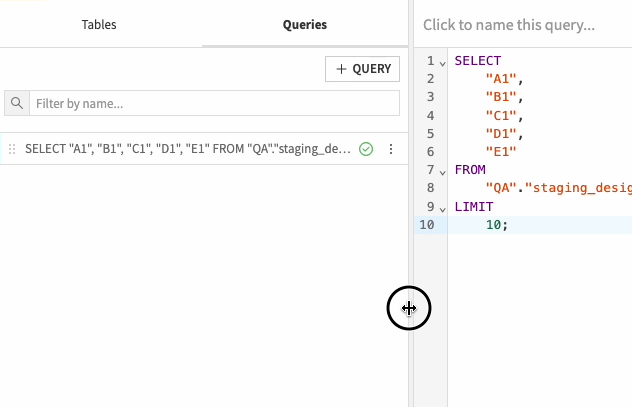
4.It's just not clear enough these can be changed or which one is selected

You are referring to this, right? If so, yes, I do understand that it is not very clear that they are indeed tabs and I can switch them.
It also requires constant flipping if you are adding tables between different queries.
This is good feedback. A follow up question here that, in your workflow, do you have to switch different queries often? And for each query, do you work on different tables? Just want to understand how big is the issue here.
5.when a connection is deleted the SQL notebook is left orphan
Could you help me to understand a bit more why a connection would be deleted? And does it happen often?
user has to move the queries to a new SQL notebook manually
This seems quite painful. Have you done this before? Or you know some of your colleague need to do it?
6. This is great functionality but it's very hard to discover
Indeed, I agree with you that the behavoir here is not consistent. Very good remark!
-
Turribeach Dataiku DSS Core Designer, Neuron, Dataiku DSS Adv Designer, Registered, Neuron 2023, Circle Member Posts: 2,719 Neuron
You are referring to this, right? If so, yes, I do understand that it is not very clear that they are indeed tabs and I can switch them.
Yes. It's just isn't clear enough which is select or that you can change them.
This is good feedback. A follow up question here that, in your workflow, do you have to switch different queries often? And for each query, do you work on different tables? Just want to understand how big is the issue here.
The issue is that the current design forces people to either select tables or select queries and if you look at the majority of SQL IDEs all pretty much allow these two things to happen at the same time.
Could you help me to understand a bit more why a connection would be deleted? And does it happen often?
Currently we have 13 DSS environments and over 600 connections in all of them. Connections come and go, new systems get added, other system are decommissioned.
This seems quite painful. Have you done this before? Or you know some of your colleague need to do it?
Yes, we done this several times. Another use for moving queries (due to the lack of changing the connection in the GUI) is testing queries across different connections (ie for testing purposes or when you are migrating between connections and want to reconcile the data). While you "copy" (aka duplicate) a SQL Notebook, DSS doesn't give the user the choice to use a different connection. So allow users to change the connection via the GUI seems like the best solution to these problems.
-
Thanks for the additional info for point 5! Indeed, it seems like if we can change the connection of the notebook through the UI, it would make life much eaasier for you guys to manage the notebooks and to test the same query on different connections. I am passing this feedback to the team.
By the way, it seems like the team knows you well and is very happy to hear your feedback!
-
Clearly not in the SQL Notebook case but if you are looking for new areas for improvement Scenarios really needs a good uplift as it's missing a lot basic features (happy to discuss offline if you want).
About the improvement for scenarios, yes! I am all ears and love to hear your perspective. Feel free to drop me an email directly and we can also jump into a call if it is easier.
han.han@dataiku.com
-
Hi @Turribeach,
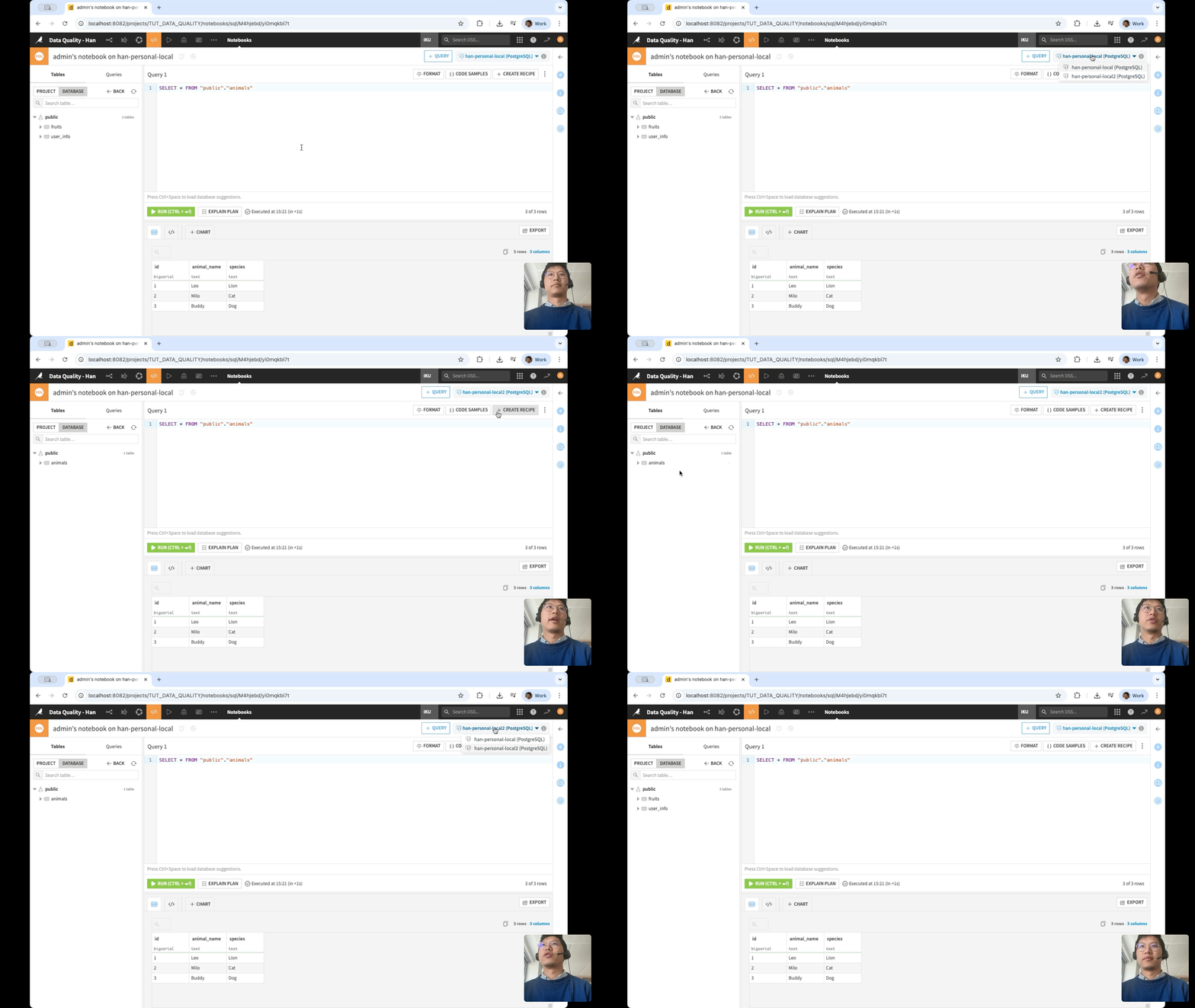
Allow to change connections for notebooks
Coming back to your feedback here. Is this something that could work for you? This is a rough prototype - to just continue our discussion.
-
Turribeach Dataiku DSS Core Designer, Neuron, Dataiku DSS Adv Designer, Registered, Neuron 2023, Circle Member Posts: 2,719 Neuron
Yeah that looks good. Is that selectable per Query or does it affect the whole SQL Notebook? How will that show in the SQL Notebook list?

-
Turribeach Dataiku DSS Core Designer, Neuron, Dataiku DSS Adv Designer, Registered, Neuron 2023, Circle Member Posts: 2,719 Neuron
Also will be good to see what happens when the connection is deleted to be sure the UI allows the user to recover from this situation gracefully.
-
Is that selectable per Query or does it affect the whole SQL Notebook?
So currently, I am thinking about affecting the whole SQL notebook rather than just a query. Any reason you think per query could be useful?
-
Turribeach Dataiku DSS Core Designer, Neuron, Dataiku DSS Adv Designer, Registered, Neuron 2023, Circle Member Posts: 2,719 Neuron
I think for the whole notebook makes sense.


