Dash Webapp: How to allow users to filter and download data from a 9M row dataset?

Hi everyone,
I am developing a Dash Webapp in Dataiku DSS. My goal is to allow end-users to interact with a very large dataset (9 million rows) through two main features:
- Dynamic Filtering: Users should be able to select criteria (dates, categories, etc.) to explore the data.
- Custom Export: Users need to download the filtered results as a CSV file.
The Technical Constraint:Obviously, I cannot load the 9M rows into a Pandas DataFrame within the Dash backend without crashing the memory.


Dataiku version used: 13.5
Answers
-
 Turribeach Dataiku DSS Core Designer, Neuron, Dataiku DSS Adv Designer, Registered, Neuron 2023, Circle Member Posts: 2,719 Neuron
There is no Dataiku version 13.7.
-
i mean 13.5
-
Turribeach Dataiku DSS Core Designer, Neuron, Dataiku DSS Adv Designer, Registered, Neuron 2023, Circle Member Posts: 2,719 Neuron
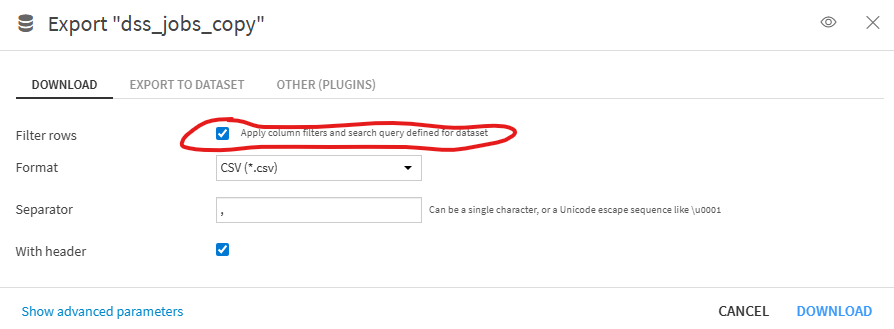
Why re-invent the wheel? The Explore dataset tab allows you to apply column filters and you can export to CSV keeping those filters if you want by enabling the "Apply column filters and search query defined for dataset" option. Dataiku streams the data so should not impact memory use. Why is this built-in functionality not suitable to you?
-
I want the end client to be able to apply filters on the database and download the results directly, without me having to do the work each time. Instead of applying the filter for every query, the end user should be able to choose the dataset they want to extract. and thanks for your help
-
Turribeach Dataiku DSS Core Designer, Neuron, Dataiku DSS Adv Designer, Registered, Neuron 2023, Circle Member Posts: 2,719 Neuron
The explore dataset tab meets all those requirements. I don’t really see what the web app will give you.
